Most Personal Knowledge Management (PKM) systems use a single daily note. I tried that for years.
Everything piled into one file: plans, logs, reflections, glucose data, AI analysis, tasks, links. Finding anything meant scrolling through hundreds of lines. Deciding where to put new information created constant friction.
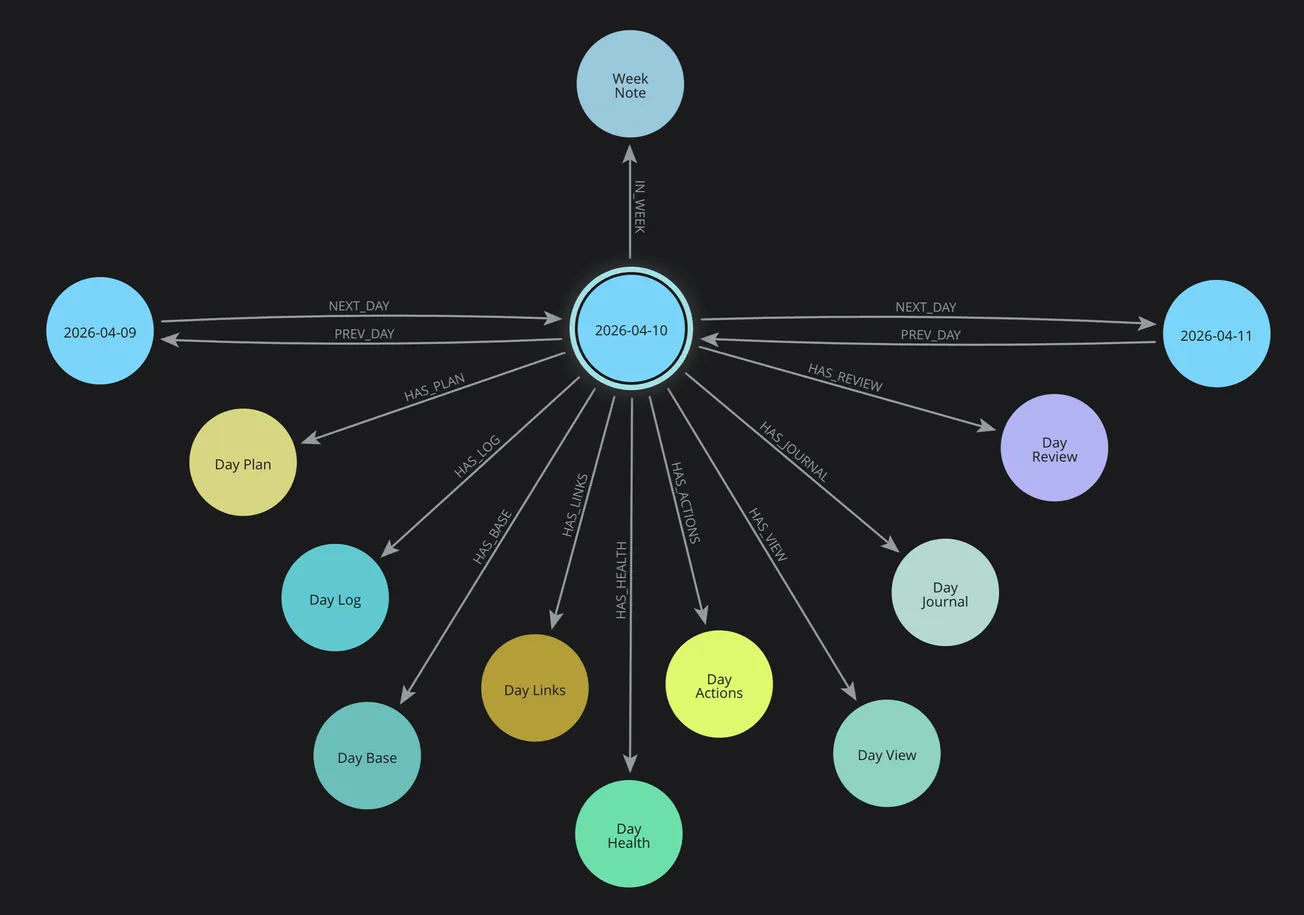
So I split my Day Note into cluster of interconnected notes—each serving a single, clear purpose.
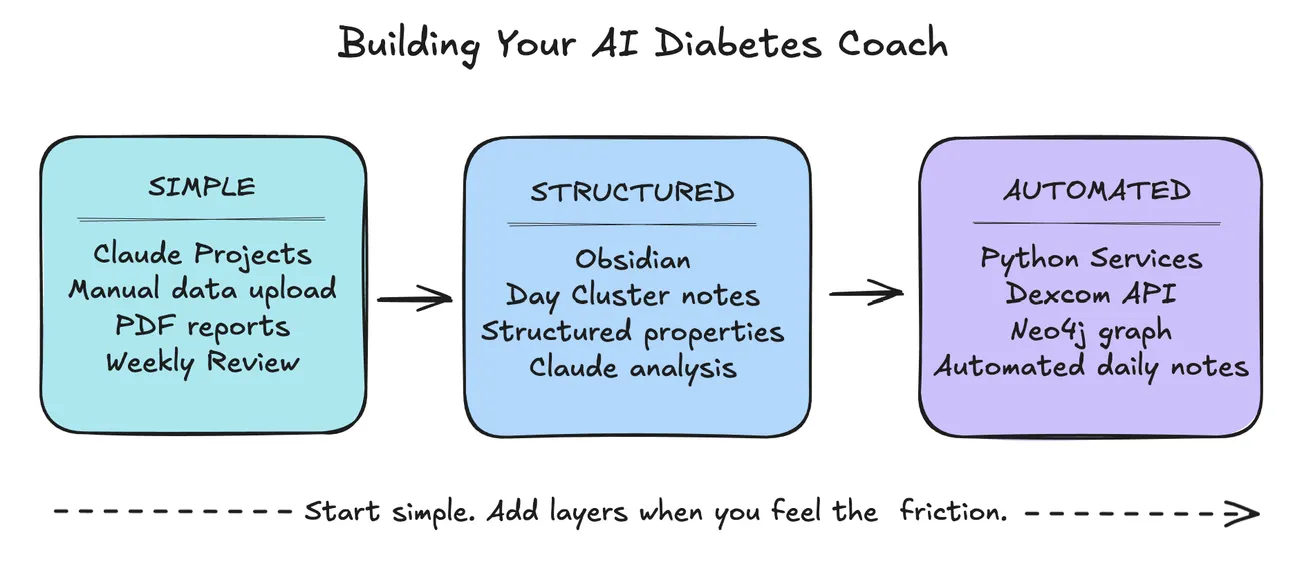
This Day Cluster structure is part of my larger AI-powered health tracking system, which I detailed in my AI Diabetes Coach series. The Calendar Service (one of five integrated services) generates these daily note clusters automatically, creating the foundation for AI analysis, pattern recognition, and health insights.
The result? Zero decision fatigue. Everything exactly where I expect it. Creating all cluster notes daily takes less mental effort than maintaining one massive file ever did.
If you've ever felt overwhelmed by a sprawling daily note, or wondered "where should this go?" while adding content, this structure might help.
Let me show you what each note does, how they work together, and why this actually reduces complexity instead of adding it.
What Is a Day Cluster?
Cluster notes explained with examples
A Day Cluster contains multiple interconnected daily notes, each with one job, instead of one massive file trying to do everything.
Core Cycle (Plan → Execute → Reflect)
- Day Plan: Your morning intentions and priorities. What do you want to accomplish today? Not a rigid schedule—just 3-5 key outcomes that matter.
- Day Schedule: Time blocks and calendar events. Meetings, appointments, time-boxed work sessions. The temporal structure of your day.
- Day Log: Timestamped record of what actually happened. Not what you planned—what you did. Quick bullets: "7:00 Wake, 7:30 Breakfast, 2:22 Lunch, 3:29 Walk."
- Day Review: Evening reflection. What went well? What didn't? What did you learn? Sets up tomorrow's planning.
- Day Analysis: AI-generated insights across all your daily notes. Pattern recognition you might miss. Claude reads your day and identifies trends.
Health Tracking
- Day Health: General wellness. Sleep quality, energy levels, symptoms, medications, exercise.
- Day Diabetes: Glucose data, insulin doses, meals, patterns. Auto-generated from Dexcom API + Glooko. Complete timeline with charts.
Productivity & Learning
- Day Actions: Task tracking. To-dos, completions, blockers. What got done, what's pending, what's blocked.
- Day Links: Resources captured during the day. Articles, videos, tools, references. Organized breadcrumb trail.
- Day Journal: Reflective writing. Processing thoughts, emotions, experiences. Deeper than Day Review—this is where you think through writing, process emotions, and work through complex ideas.
- Day Output: What you created today. Blog posts, code, designs, documents. Your creative work and productive output.
Visual Tools (Optional)
- Day Canvas: Visual workspace for arranging ideas spatially. Collect content, draw relationships, model structure.
- Day Board: Kanban-style task organization. Visual workflow management.
- Day Mindmap: Visual thought mapping and idea connections (with links).
- Day Drawing: Sketches, diagrams, hand-drawn visualizations using Excalidraw.
- Day Base / Day View: Different perspectives on the same data. List view, calendar view, relationship view. Property-based queries and embedded views. Filter, sort, and organize notes by metadata.
Not every note is needed every day. Use what serves you. The structure is there when you need it.
Why 13 Notes Instead of One?
Separation of concerns, cognitive load, etc.
The answer comes down to two principles: separation of concerns and cognitive load management.
Separation of Concerns
In software architecture, separation of concerns means each component does one thing well. A function that tries to do everything becomes unmaintainable. The same principle applies to personal knowledge.
When plans, logs, reflections, glucose data, tasks, and links all live in one note:
- Finding specific information requires scrolling
- Adding new content requires decisions ("where?")
- Updating one section risks disrupting others
- The file becomes a dumping ground, not a tool
When each concern has its own note:
- Location is obvious (glucose → Day Diabetes)
- No scrolling needed (open the right note)
- Updates are isolated (edit Day Plan, Log unaffected)
- Each note maintains its purpose
Cognitive Load Management
Decision fatigue is real. Every micro-decision—"where does this go?"—drains mental energy.
With one daily note:
- Should glucose data go at top? Bottom? Inline?
- Should I timestamp this? Under what heading?
- Is this a plan, a log entry, or a reflection?
- Where did I put yesterday's similar note?
With separated notes:
- Glucose → Day Diabetes (automatic)
- Timestamped → Day Log (obvious)
- Reflection → Day Journal (clear)
- Yesterday's → Same structure (predictable)
The structure removes decisions. Removing decisions preserves energy for work that matters.
Context Switching as Feature, Not Bug
"But doesn't switching between multiple cluster notes create friction?"
Counter-intuitively, no. Intentional context switching is clarifying. When you open Day Plan, your brain shifts to planning mode. When you open Day Log, you're in recording mode. When you open Day Review, you're in reflection mode.
The physical act of navigating to a different note signals a mental shift—changing your focus and attention. The separation becomes a feature that helps you think clearly about what you're doing.
Compare this to scrolling through one massive note trying to find the right section while fighting the cognitive pull of everything else you see along the way.
Single Responsibility Principle
Each note has exactly one job:
- Day Plan: What I intend
- Day Log: What happened
- Day Review: What I learned
This isn't complexity. This is clarity.
When something has one job, you know:
- What belongs in it
- What doesn't belong in it
- Where to find it later
- How to use it effectively
Multiple cluster notes, different purposes, zero confusion.
Neurodivergent-Friendly Design
Six principles that reduce cognitive overhead
This cluster note structure emerged from solving real friction points in daily tracking. But the design principles go deeper than personal preference—they address challenges common across neurodivergent experiences.
Every day brings challenges with organization, planning, problem-solving, decision-making, and time management. Watching people with neurodivergence such as ADHD navigate daily challenges taught me something: the tools we build matter. Structure can either amplify friction or eliminate it.
As I've learn more about neurodivergence—and recognized some of these patterns in my own thinking—I've come to see how certain design choices make systems more sustainable:
Reduced Decision Fatigue
The structure is identical every day.
- You never face a blank page wondering "how should I organize today?"
- The Day notes are always there, always the same, always in the same order.
- For someone managing executive function challenges, this consistency removes dozens of micro-decisions.
Clear Contexts
Each note serves one purpose.
- Day Plan is ONLY for planning.
- Day Log is ONLY for timestamped events.
- Day Diabetes is ONLY for glucose data.
When you open a note, you know exactly what belongs there. No mental sorting, no category confusion, no "where does this go?".
Low-Friction Creation
- The entire structure generates automatically.
- Run
pkm-day createand all Day Cluster files appear, pre-linked, ready to use. - No manual file creation, no template selection, no setup time.
- The barrier to starting is zero.
Visual Navigation
- Links replace search.
- The Day Index shows all cluster notes (core, support, visual) at a glance.
- Click to navigate.
- No remembering file names, no search queries, no cognitive overhead.
The structure is visible, not memorized.
Consistent Patterns
- Every day follows the same flow: Plan → Log → Review.
- Every note uses the same template.
- Every connection works the same way.
- Consistency builds habits, habits reduce friction, friction is what stops us.
Progressive Disclosure
You don't need all cluster notes on day one.
- Start with Day Note + Day Log.
- Add Day Plan when planning helps.
- Add Day Review when reflection helps.
Build the system gradually as needs emerge. No overwhelm, no pressure, no "I must use all features."
The structure supports you—you don't serve the structure.
Whether you're neurodivergent or simply looking for a system with less cognitive overhead, these principles reduce the friction between intention and action. And that's what makes daily practice sustainable.
How They Work Together
Relationships, navigation, workflow
The Day Cluster notes aren't random—they map to a complete daily workflow that many people already practice, often in scattered tools or mixed-together notes.
Core Daily Cycle
- Morning: Plan (intentions)
- Throughout: Log (reality)
- Evening: Review (reflection) ↓ Next Day's Plan
Specialized Tracking
- Health: Day Health (wellness)
- Day Diabetes (glucose)
- Actions: Day Actions (tasks)
- Learning: Day Links (resources)
- Insight: Day Analysis (AI coaching)
Documentation
- Reflection: Day Journal (processing)
- Output: Day Output (creation)
- Meta: Day Note (connections)
Each note has a purpose. Together, they create a complete picture of the day.
For example, yesterday (April 1, 2026):
- Day Plan: Publish Day Cluster post, post community & social web announcements, engage with comments
- Day Log: 7:00 Wake, 7:30 Breakfast, 2:22 Lunch, 3:29 Walk (27 min)
- Day Diabetes: 128 avg, 84% TIR, 22u insulin
- Day Analysis: Claude identified dawn phenomenon
- Day Review: Series momentum building, 10-day health streak
- Day Journal: Reflections on neurodivergence challenges
There are six different notes, six different contexts, one coherent day.
- The Day Index ties them together.
- Links show relationships.
- Navigation is visual.
- The structure emerges from use, not force.
Getting Started
Progressive approach - start simple
You don't need to build all Day Cluster notes at once. Here's a progressive approach:
Minimum Viable Day Cluster (Week 1)
Start with just two notes:
- Day Note: Your hub/index for the day
- Day Log: Timestamped record of what happened
Create these manually or with a simple Templater template. Link them together. Use them for a week.
Add Planning (Week 2)
When you're comfortable logging, add:
- Day Plan: Morning intentions and priorities
Now you have: intention (Plan) → reality (Log) → navigation (Note). This is already powerful.
Add Reflection (Week 3-4)
As the habit builds, add:
- Day Review: Evening reflection and synthesis
Now you have the complete daily cycle: Plan → Log → Rview → next day's Plan.
Add Context-Specific Notes (As Needed)
Only add other notes when you have a clear use case:
- Tracking health? → Day Health, Day Diabetes
- Managing tasks? → Day Actions
- Capturing links? → Day Links
- AI coaching? → Day Analysis
Automation (Optional)
The Day Cluster note structure can be:
- Manual (Templater + Dataview)
- Semi-automated (Python scripts)
- Fully automated (pkm-day + Neo4j)
Start simple. Automate only when manual becomes friction.
Tools You Might Use
From simple templates to advanced automation
- Obsidian: Base system (required)
- Templater: Template automation (recommended)
- Dataview: Timeline queries (helpful)
- Python: File generation (optional)
- Neo4j: Graph relationships (advanced)
Begin with Obsidian + Templater. That's enough to build the foundation.
Learn More
This Day Cluster structure powers the Calendar Service in my AI Diabetes Coach series. See Part 2 for the complete system architecture and how these daily notes integrate with AI analysis, health tracking, and Neo4j graph queries.
Related Series
If you're interested in how the Day Cluster feeds into an AI-powered health coaching system, check out the companion series:
AI Diabetes Coach
- 🚀 Part 1: The Transformation
- 🏗️ Part 2: System Architecture
- 💭 Part 3: Prompt Engineering
- 🕸️ Part 4: Knowledge Graph
- Part 5: Build Your Own (coming soon)