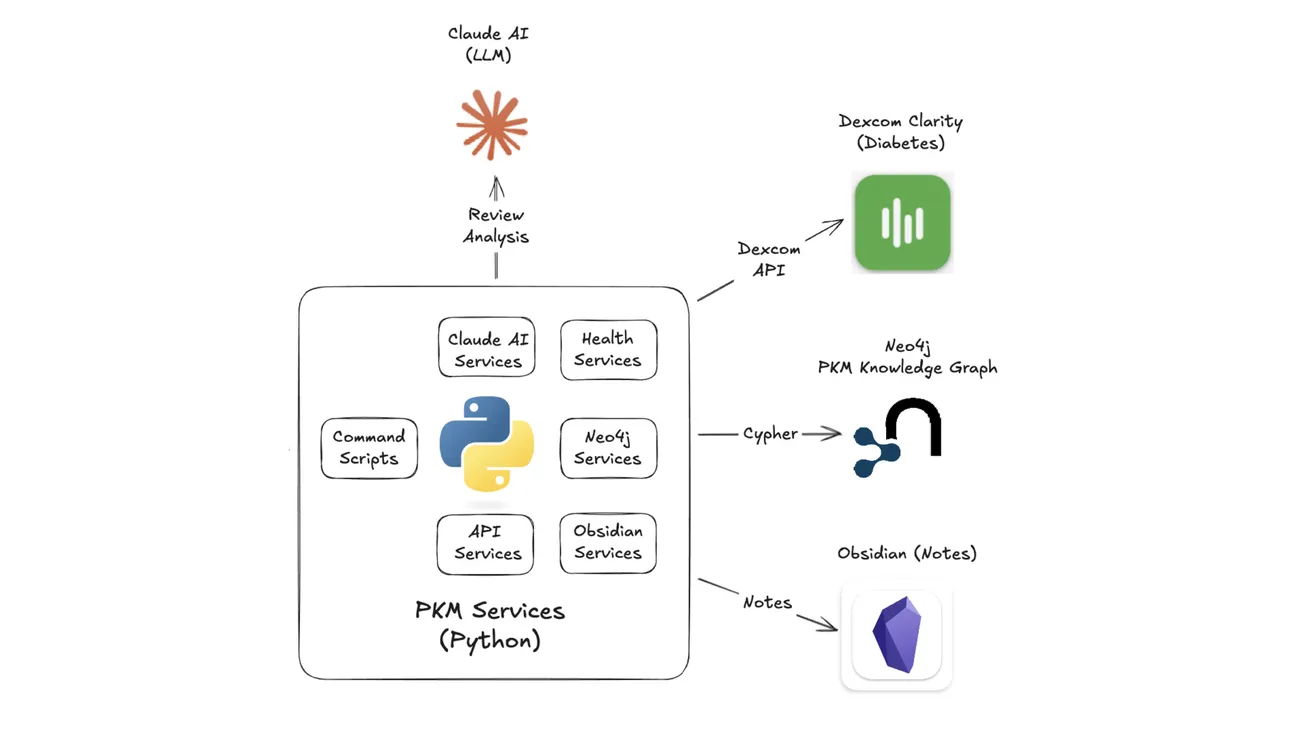
I'm doing a tiny experiment using my Day cluster notes in Obsidian: Plan, Log, Journal, Review, Actions, and Links. These are the results of my Day 3 trial for Wednesday, Jan 14, 2026 with a brief summary, what went well (Plus), what didn't (Minus), and what can I do (Next).
Summary
I made a significant breakthrough today using QuickAdd macros to automatically configure an Obsidian workspace for my Day Cluster notes. This enables me to trigger a sequence of Obsidian commands from Python services that assemble my Day cluster notes into stacked sliding tab groups: Day/Plan +Log/Journal + Actions/Links.
➕ Plus
- Transformation from window chaos to one-click layout.
- Saves 5-10 minutes per day since I don't have to manually configure Day cluster window/pane/tab layout.
- Now I can immediately begin my morning working on my Plan intentions, Log activities, reflect and freewrite in my Journal throughout the day.
- Identified additional enhancements for my Day cluster templates based on actual usage and workflows, especially related to Meta notes and Action links.
- Having consistent layouts reduces cognitive load and improves enables more gardening with notemaking with minimal structural support.
➖ Minus
- Occasionally, I made some tentative changes in my note templates to see how that works, but then forget to integrate those changes back in my templates (so I have to redo them the next day).
- Sometimes, I'm still getting bogged down exploring ways to automate my workflow for a quicker and simpler friction-free process.
- I still have not been able to get time for reading that I want to do because I'm still working out the bumps in my workflow.
- I don't always get to planned activities later in the day because it's still taking too long in the morning, but it's getting better.
➡️ Next
- Further consolidation and testing of enhanced templates.
- Improve wayfinders with navigation and hierarchy links for associated time horizons and related cluster types.
- Further testing of Dexcom API and refinement of generated Diabetes Review based on earlier work I did for personal diabetes management.
- Automated integration of Calendar and Health events using Swift Services, EventKit, and HealthKit.